Live on Chrome & Firefox

Run every Sleeper
league from one tab.

QuickManager scans all your leagues at once — optimal lineups, waiver targets, and trades — so a Sunday morning routine that used to take twelve tabs takes one click.

Leagues managed at onceUnlimited*
Setup requiredNone
Your Sleeper token leaves your deviceNever
Free trial7 days, all leagues
What it does

Four tools. Every league.

Managing one Sleeper league is easy. Managing ten is a chore. QuickManager turns hours of repetitive, league-by-league clicking into a few clicks that run everywhere you play.

01 — OPTIMIZER

Mass Lineup Optimizer

Scan every league at once and see exactly how many points you're leaving on the bench. Pick a week, review the swaps, apply optimal lineups everywhere with one click. Bye weeks and projections are handled automatically. Optionally prioritize your latest-kickoff players into FLEX spots, so you can still pivot as early games wrap up.

02 — WAIVERS

Waiver Wire & The Waiver Board

Add the players you want this week to one target list, and see where each is gettable across every league at once. Every claim it builds is fully editable — change the drop from a dropdown, or add your own fallback attempt if your first plan doesn't land. Manage claims you've already submitted right there too, with a true total exposure number against your budget. Free Agent Radar and Mass Drop round it out — surface the best unowned players, or cut a flier from every roster you added them to in one action.

03 — TRADES

Trade Factory

Define a trade and scan every league for valid partners. Review every pending offer across all your leagues in one place — accept, decline, counter, or withdraw without hunting league by league.

04 — MATCHUPS & POWER RANKINGS

Season Simulation, League by League

See this week's matchup and win probability everywhere at once, then simulate the rest of the season thousands of times for real playoff odds and a positional breakdown against the league. The Player Portfolio adds the gameday pass: every lineup you manage, in kickoff order, showing only the ones that still need a decision.

See everything it does →
See it running

The actual product. No mockups.

Every screenshot below is the real interface, not a mockup. Most are live runs against real leagues; the positional breakdown uses a sample one so nobody else’s team names end up on this page.

Lineup Optimizer

Applies changes you can actually trust

Each swap shows the real points gained or lost — never a fake number from two players simply changing slot labels. If nothing about the lineup's value actually changed, it says so plainly instead of inventing a trade that didn't happen.

  • Every OUT/IN row nets to real, verified points — no phantom swaps
  • "Slot changes made (no lineup change)" when the reorg has zero impact
  • Bulk-apply every league at once, or open any single one in the full editor first
QuickManager Mass Lineup Optimizer showing per-league results, an optimal lineup, and a real point swap with an honest slot-change note
Matchups & Power Rankings

Know where your week actually swings

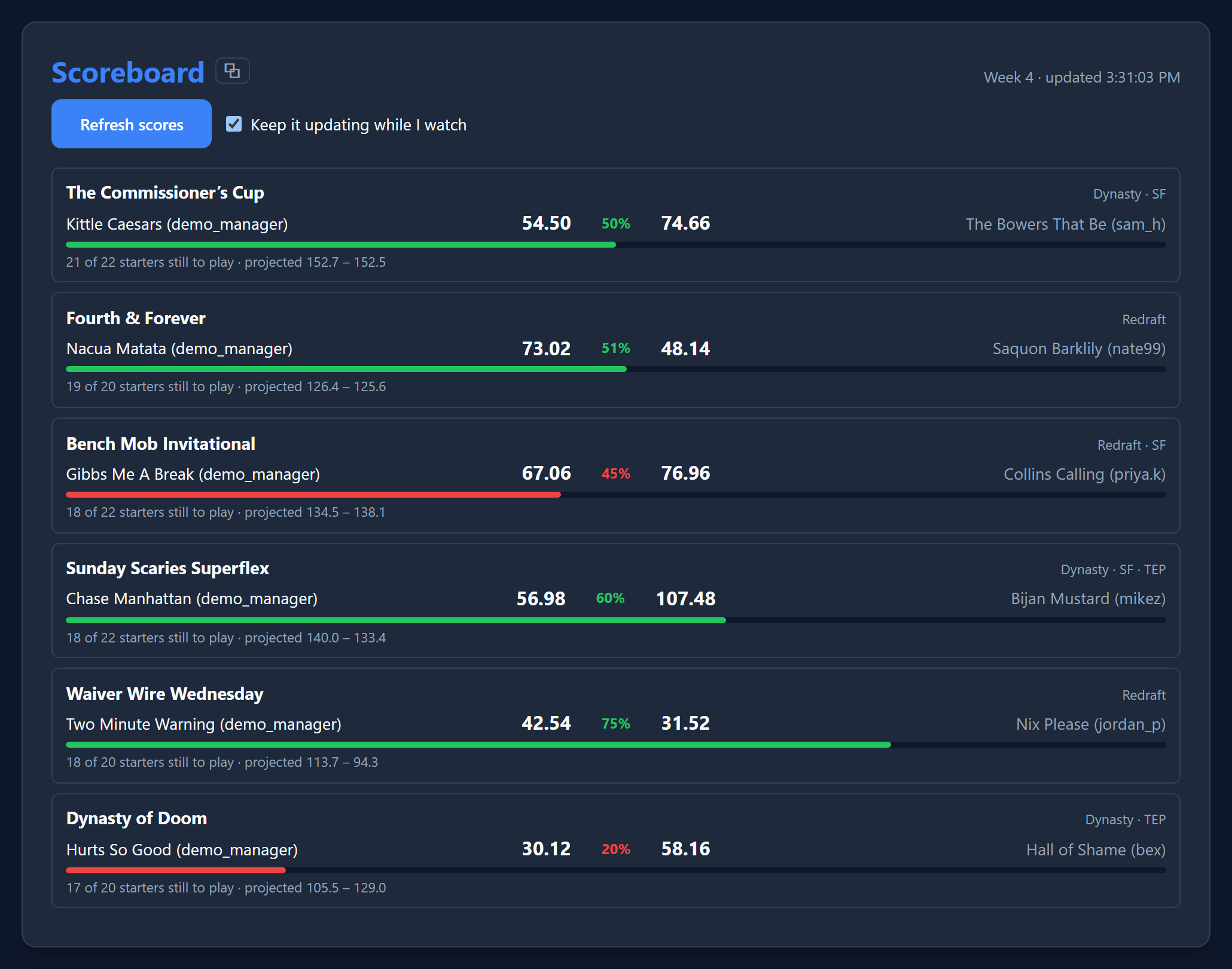
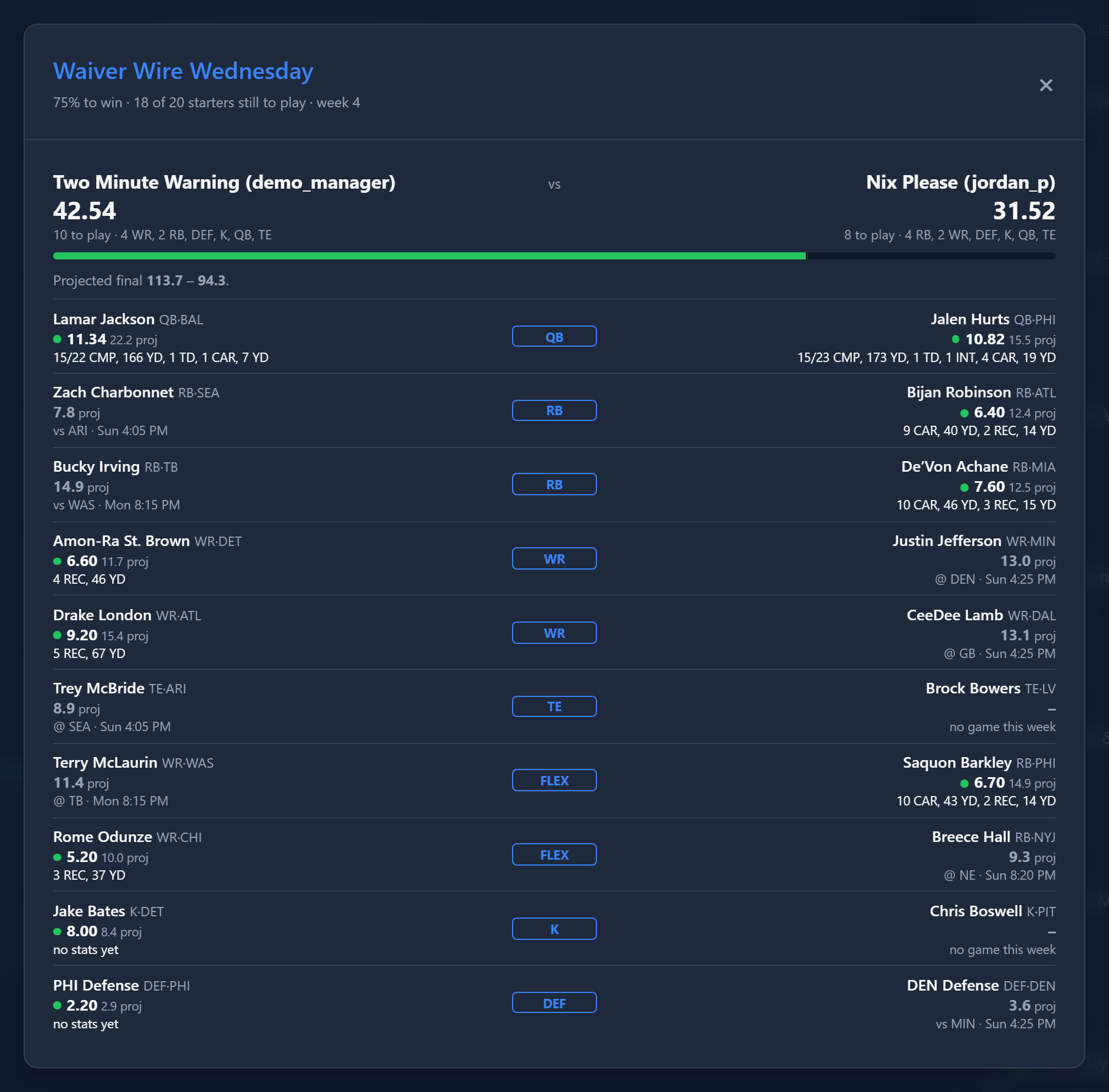
See this week's matchup and win probability for every league at once, then run a full season simulation to find which leagues are still genuinely in play. A cross-league table ranks every roster by how much attention is actually worth spending on it right now.

  • Real-time win probability alongside the projected score, every league
  • Simulated playoff odds, sortable by week-swing, fragility, or weakest slot
  • Click any league for the full detail view — see below
QuickManager Weekly Matchups with win probability, and the Power Rankings cross-league triage table ranked by week swing
Power Rankings — Detail View

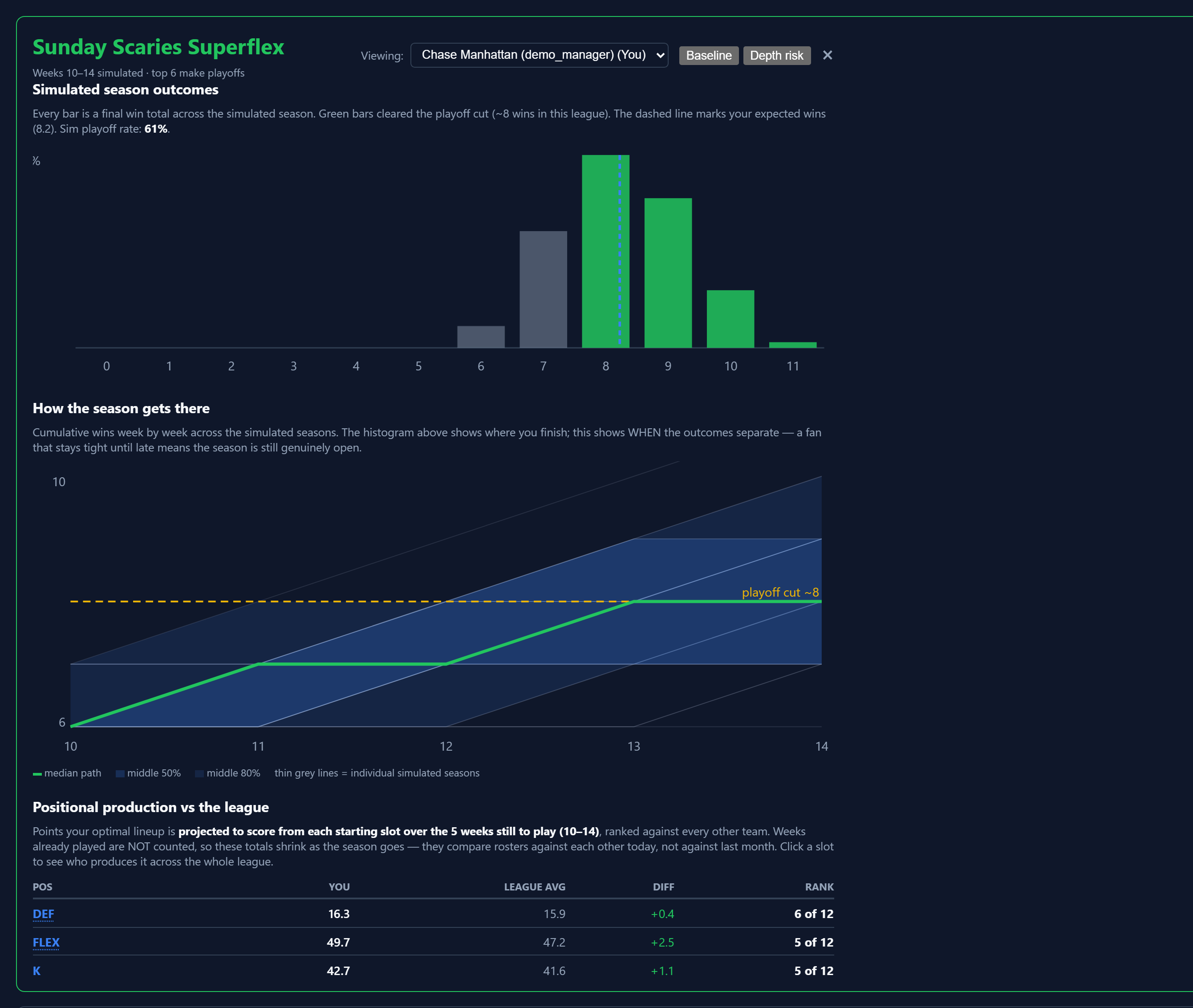
Not just odds — the whole shape of your season

A fan chart of every simulated path shows exactly when your season's outcomes actually separate, with the real playoff cut line drawn in from the simulation itself. A positional table ranks your team against the rest of the league at every position, so you know precisely what to go fix.

  • Thousands of simulated seasons, condensed into percentile bands and a median path
  • Toggle between your optimal lineup and a depth/injury-adjusted model
  • Position-by-position rank against the whole league, not just a total score

Any run saves to a single file you can keep. One click writes the whole thing — charts, tables and the positional breakdown — to one self-contained HTML page that still works offline, with nothing to install to open it. Send it to a leaguemate, keep it as a record of where week 10 stood, or open it next season.

Open a saved run → Real export, invented leagues — nobody else’s team names.
QuickManager Power Rankings detail view with a win-total histogram, a fan chart of simulated season paths, and a positional production table
Player Portfolio

Every player you own, across every league, at once

See your real cross-league exposure to any one player — who you're most riding on, and which of those leagues are actually still live. Age context flags players entering, past, or well beyond their typical prime, without ever predicting what they'll do next.

  • One list, every league — filterable by league type or position
  • Exposure percentage per player, with a live-league count next to it
  • Age-window flags (ascending, prime, past-prime, age risk) as context, never a forecast
QuickManager Player Portfolio showing cross-league exposure percentages and age context for every rostered player
Player Portfolio — Gameday

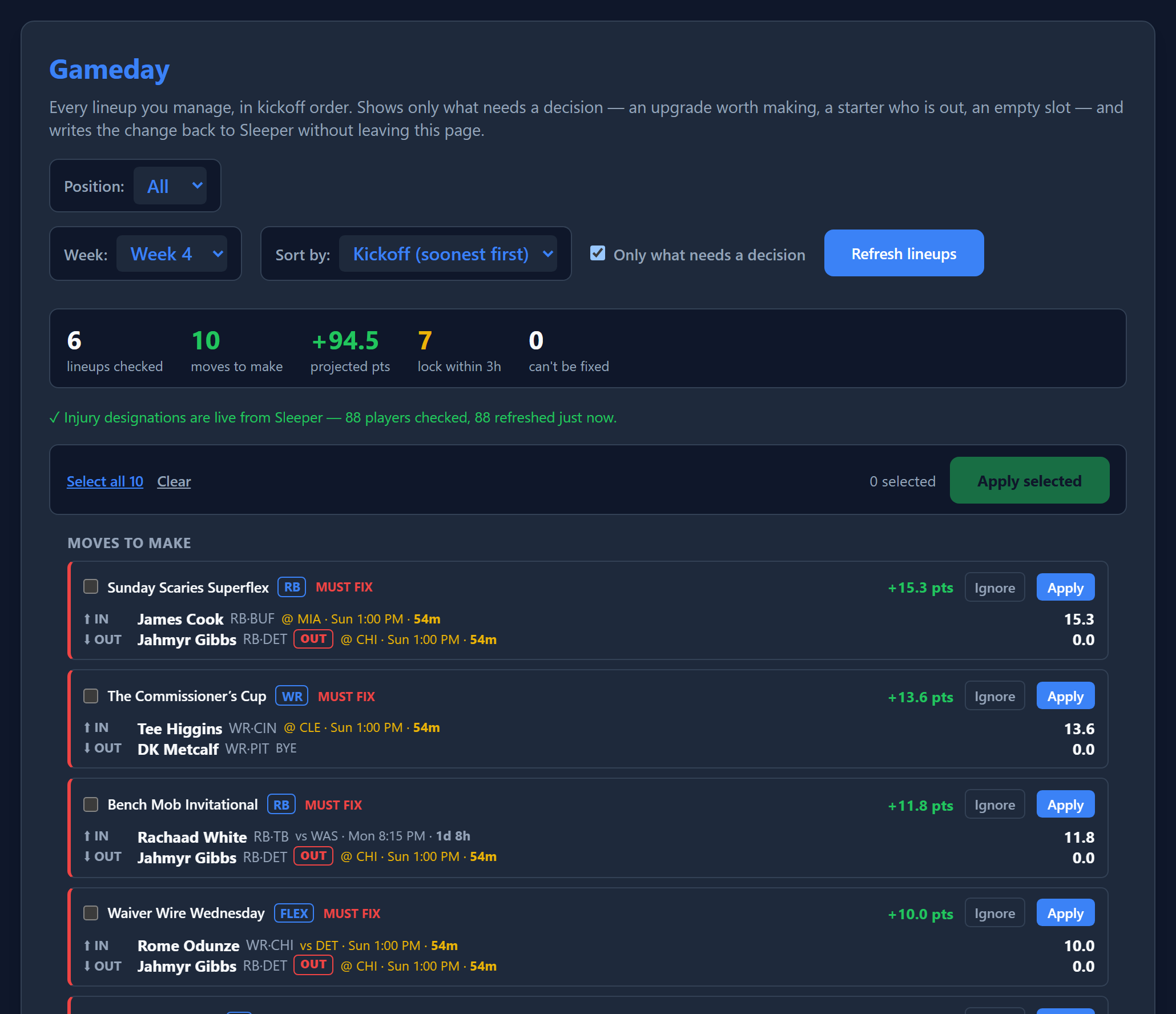
Every lineup you manage, in kickoff order

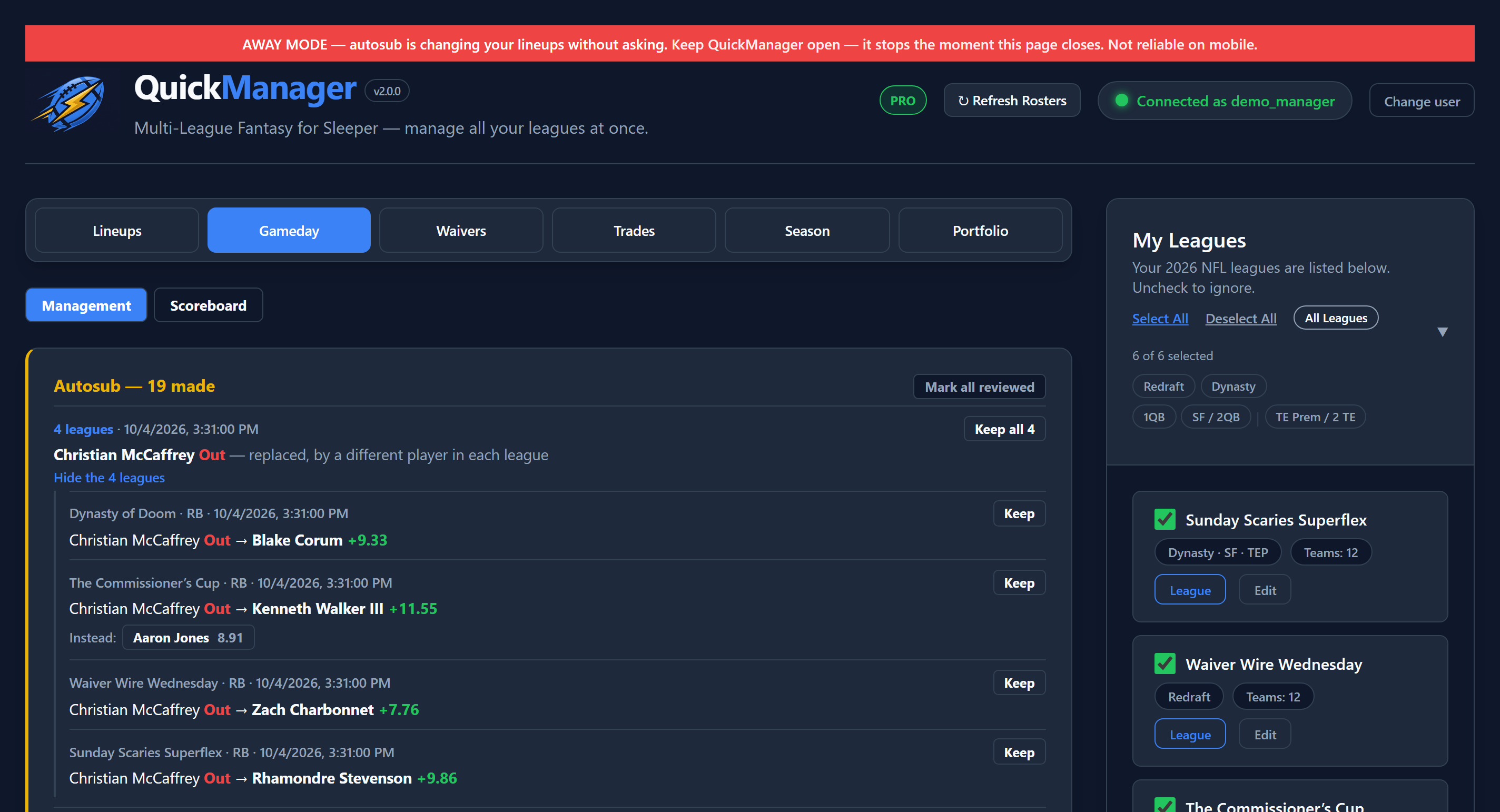
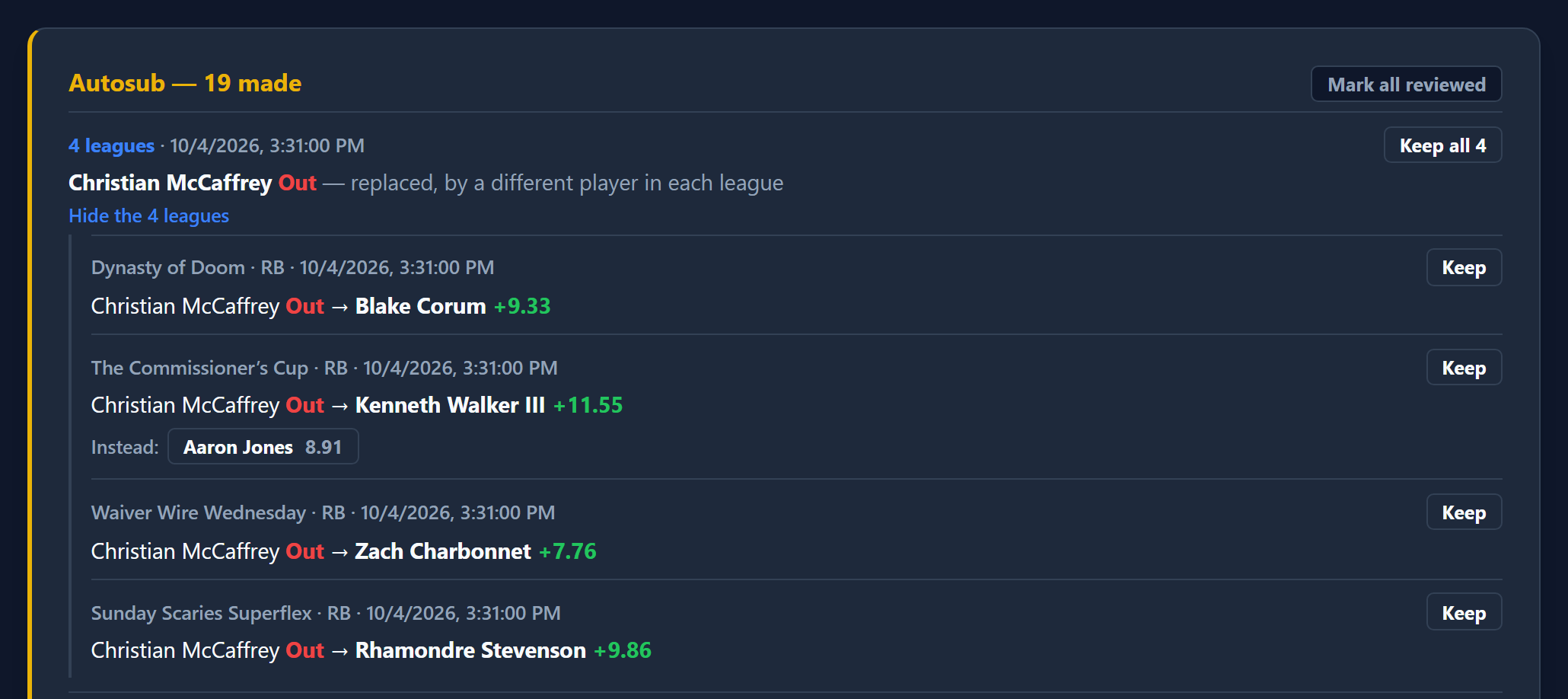
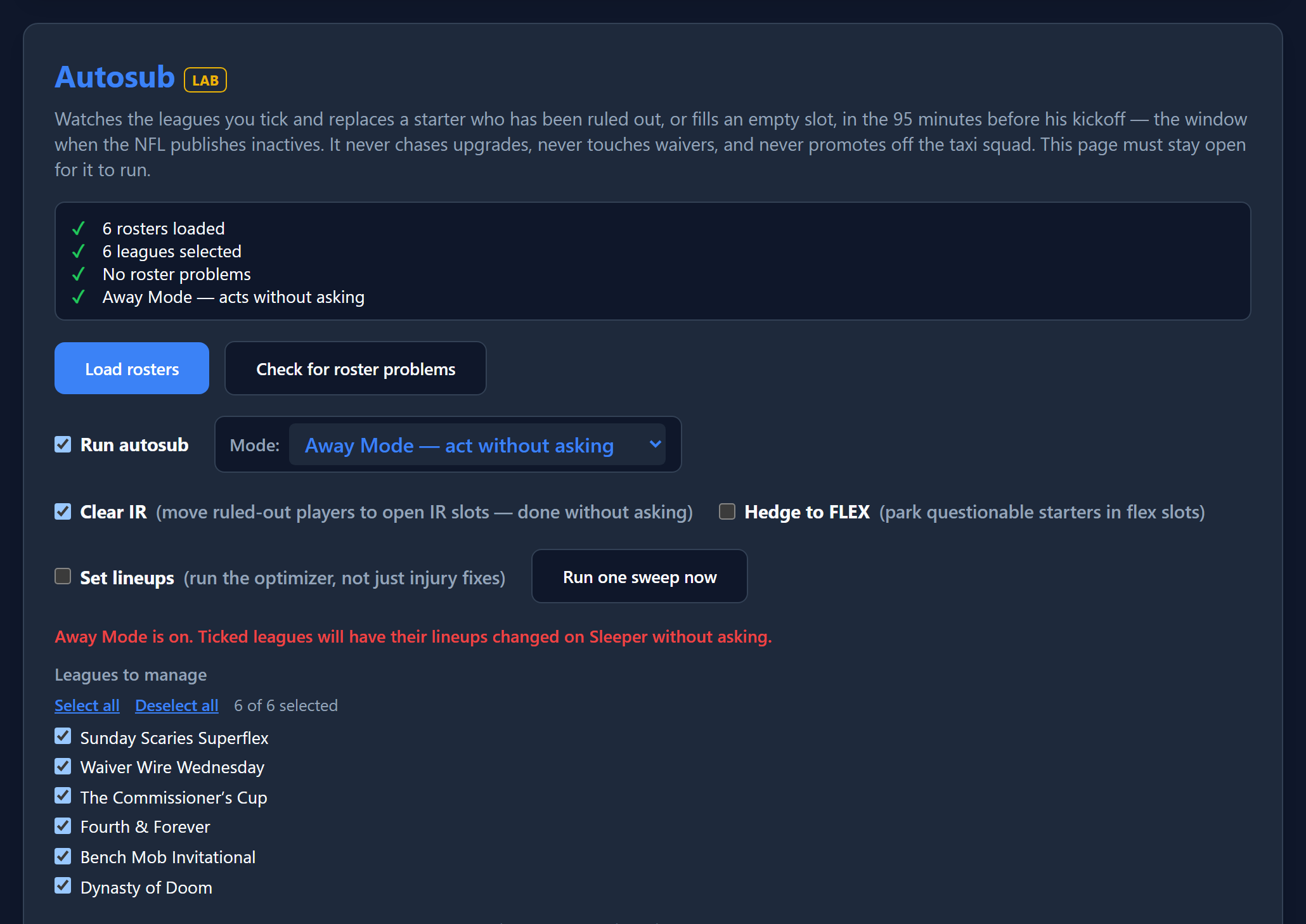
Sunday morning, a dozen teams, not much time. This finds the two or three lineups that actually need a click and stays quiet about the rest — an upgrade worth making, a starter who's been ruled out, an empty slot — then writes the change back to Sleeper without leaving the page.

  • Ordered by kickoff, because that's the deadline — anything already locked is marked, never offered
  • Every suggestion names both sides: who comes in, who goes out, and what the swap is worth
  • Tick the ones you agree with and apply them across every league at once
QuickManager Gameday board listing cross-league lineup swaps in kickoff order, each naming the player coming in, the player going out, and the projected points gained
Waiver Wire & Free Agent Radar

Find the add, build the claim, in one screen

Free Agent Radar scans the whole player pool for standouts — filter by position or NFL team, include already-rostered players to scout trade targets, and add anyone straight to the Waiver Board. Manage every pending claim across every league without hunting league by league.

  • Position and team filters, plus an "include rostered" toggle for trade scouting
  • One-click add to the Waiver Board, single or in bulk
  • Mass Drop and pending-claim management for every league, in one place
QuickManager Waiver Wire tab with pending waivers, the Waiver Board, Mass Drop, and Free Agent Radar with position and team filters
Trade Factory

Deterministic Trade Impact

Before pulling the trigger on a trade, run a two-sided Monte Carlo simulation. QuickManager isolates exactly how a trade impacts both teams' playoff odds, and its optional depth-injury model reveals the hidden fragility in trading a star for scrubs.

  • Isolates the exact playoff odds impact using 2,000 parallel realities
  • Depth-injury model simulates random injuries across both sides of the trade
  • Works flawlessly for blockbusters involving both players and draft picks
QuickManager Trade Impact Simulator showing before and after playoff odds and the roster fragility chart
New in 1.6.0

Who is actually good at wide receiver, and on the back of whom

Click any position in a league's simulation and the whole league opens up in that one slot: every manager ranked by what it is projected to produce, with the players carrying it listed beside them. Sort by any column to flip the question around.

  • The number of players listed matches what your league actually starts — three in a 3-WR league, not one
  • SUPERFLEX is its own row, never folded into FLEX, so a superflex league reads correctly
  • Points are what each player is projected to earn while filling that slot — a tight end who keeps winning your flex shows up under FLEX
QuickManager positional breakdown listing every manager in a league ranked by projected wide receiver production, with their top three contributing receivers beside each row
Shipping now — v1.6.0

Ready for the season.

A big round of interface work ahead of kickoff — the screens you'll live in on a Sunday, rebuilt around what you actually do with them.

Power Rankings

The Positional Breakdown

Every position in a simulated league is now a link. Open one and you get the entire league ranked by that slot's projected production, each manager sitting next to the players carrying it — sortable by any column. The number of contributors matches the number of starters your league actually uses, and SUPERFLEX is ranked on its own rather than folded into FLEX, so a superflex league finally reads the way it plays.

Trade Factory

Trades, Start to Finish

Point the simulator at a specific manager and their roster becomes a selectable list, their draft picks come into play, and you can send the offer without rebuilding it somewhere else — with a DM attached if you want one. Everything the extension sends now stops at a summary of what's moving each way, so nothing reaches Sleeper you haven't read.

Exports

Take the Numbers With You

Export your starters one row per team, per slot, per contributing player — as a flat CSV, or as a spreadsheet with each league on its own sheet and the numbers left as numbers so they sort and chart. The saved HTML page carries the positional breakdown with it too.

Everywhere

Say Who You Mean

Teams and managers are named together, in one consistent format, everywhere the extension mentions either — so you stop having to remember which of your leagues calls that person what. League filters stopped offering options that would return nothing, too.

Also in the build

Seven more things nobody asked us to build twice.

Shipped before 1.6.0, and all still here.

Player Portfolio

The Gameday Board

Every lineup you manage, ordered by kickoff, showing only what still needs a decision — an upgrade worth making, a starter who's been ruled out, an empty slot. Each suggestion names both players, the slot it touches, and what the swap is actually worth in that league's own scoring. Tick the ones you agree with and apply them across every league at once. Anything already locked is marked as locked and never offered.

Trade Factory

Deterministic Trade Impact

Before pulling the trigger on a trade, run a two-sided Monte Carlo simulation. By running 2,000 parallel realities for both teams using a shared seed, it isolates the exact playoff odds change caused purely by the trade itself.

Trade Factory

Roster Fragility Model

A star-for-scrubs trade looks great until a bye week hits. The Trade Simulator now features an optional depth-injury risk model that applies random injuries to both sides of the trade to reveal how it actually impacts your roster's fragility.

Roster Editor

Spy Mode

Look up another manager's roster and situation without pretending you can act on it — the tabs that would let you submit anything are grayed out automatically the moment you're viewing someone else's team.

Waiver Board

An Optional Cap on Total FAAB Spend

Set a ceiling on what a whole board of claims could cost you, across every claim at once. It catches the case where the cap you set is actually lower than your own top single bid, before you submit anything.

Draft Picks

Exact Pick Slots, Not Just "Round 1"

Draft picks now resolve to a real slot — "1.05, 5th overall" — computed from your league's actual draft order, handling snake, linear, and 3rd-round-reversal formats. When a draft's order genuinely isn't set yet, it says so plainly instead of guessing.

Everywhere

Full IDP Support

Defensive players are ranked, optimized, and slotted correctly wherever the extension touches a lineup — DL, LB, and DB starters are treated exactly like every offensive position, using your league's own IDP scoring.

Free vs Pro

Try the whole thing first.

Every feature works on the free plan for up to 5 leagues. Upgrade when you're ready to run it everywhere.

Free
$0
  • Every feature, fully working
  • Applies to up to 5 leagues
  • Unlimited scans and previews
  • No credit card required
Pro
$25 / year
  • Everything in Free
  • Applies to every league at once
  • 7-day free trial, no card needed to start
  • Cancel anytime from the extension
Setup

Two minutes, then it runs itself.

QuickManager connects to your existing Sleeper session — there's no account to create and no password to give us.

Desktop — Chrome, Edge, Brave, and Firefox

Install the extension

Add QuickManager from the Chrome Web Store (Chrome, Edge, Brave) or Firefox Add-ons (desktop and Android).

Log into Sleeper

Open sleeper.com in any tab and sign in as usual.

Open QuickManager

Click the toolbar icon. It connects automatically and pulls in your leagues.

iPhone & iPad — via Orion

On iOS, QuickManager runs inside the Orion browser (free, by Kagi) — the only iOS browser that supports Chrome/Firefox-style extensions. Not Safari.

Install Orion, then QuickManager inside it

Orion supports Chrome and Firefox-style extensions natively.

Open sleeper.com in Orion and log in

Then turn on Request Desktop Website from the page-settings menu — this is what makes Sleeper generate your login token.

Let the page fully reload

A floating button appears on the Sleeper page and turns blue once your token is captured.

Android — via a Chrome-extension-capable browser

Most Android browsers don't support extensions, but a few Chromium-based ones do. Look for one that explicitly advertises Chrome extension or Chrome Web Store support.

Install a browser that supports Chrome extensions, then QuickManager inside it

Search your device's app store for a Chromium-based browser that lists Chrome extension support — most give you direct access to the Chrome Web Store to install QuickManager the same way you would on desktop.

Open sleeper.com in that browser and log in

Sign in as usual. If your token isn't captured automatically, check for a "Request Desktop Site" option in the browser's page menu — turning it on helps Sleeper generate the token correctly.

Open QuickManager from the toolbar

It should connect automatically once your token is captured.

Stuck on mobile? Tap the floating "Copy Token" button on the Sleeper page, then paste it into QuickManager's "Paste Bearer Token" box. This works even if auto-connect doesn't, on both iOS and Android.
FAQ

Good questions.

Is my Sleeper login safe?

Yes. Your login token is read locally and stored only in your browser — it never leaves your device, and QuickManager has no server that could see it.

Why isn't my lineup change showing up?

Click "Refresh Rosters," then re-run the optimizer. Lineups are set per week, so double-check the Target Week matches the week you edited.

Do you support IDP leagues?

Yes. Defensive players (DL, LB, DB) are ranked and optimized just like everyone else, using Sleeper's IDP projections and your league's own IDP scoring settings.

Is this affiliated with Sleeper?

No. QuickManager is an independent tool built to work with your existing Sleeper account. It isn't affiliated with, endorsed by, or sponsored by Sleeper.

How do I cancel Pro?

Open QuickManager and use the account management link next to your Pro badge — payments are handled by ExtensionPay and Stripe, and you're never charged without a clear renewal notice beforehand.

Privacy Policy

What we do (and don't) collect.

Last updated: August 2026

QuickManager ("the extension") is a browser extension that helps you manage your Sleeper fantasy football leagues.

Data we access

  • Your Sleeper authentication token and account ID — read from your browser so the extension can act within your own logged-in Sleeper session, and so it can confirm the username you enter matches the account you're signed in as. Both are stored only on your device and never transmitted to us or any third party.
  • Your Sleeper league, roster, and player data — read directly from Sleeper's servers by your browser, used only to display and act on your leagues. It is not collected or stored off-device.

    What "acting on your leagues" means

    When you use a feature that changes something, the extension sends that specific request to Sleeper using your own logged-in session — the same as if you'd clicked the button on Sleeper's own site or app. This includes setting lineups, submitting or editing waiver claims, proposing, countering, or modifying trades, moving players to or from IR or the taxi squad, and dropping players. Nothing happens automatically or in the background — every action is one you initiated.

    Sending a message on your behalf. When you propose or counter a trade, you can optionally check a box to also send the other manager a Sleeper direct message with the trade attached. This only happens if you check that box for that specific trade — it's never sent automatically, and the extension doesn't read, store, or otherwise access your Sleeper messages beyond delivering that one message.

  • Preferences and a cached player list — stored locally on your device so the extension runs quickly.

Data we do not collect

We do not operate a server that receives your data. We do not collect, sell, or share your personal information, browsing history, or Sleeper credentials.

Payments

Optional Pro upgrades are processed by ExtensionPay using Stripe. Your email and payment details are handled by ExtensionPay and Stripe under their own privacy policies. The extension only checks whether your account has an active pass.

Third parties

The extension communicates only with Sleeper (sleeper.com, api.sleeper.app) and, for payment status, ExtensionPay (extensionpay.com).

Affiliation

QuickManager is an independent product and is not affiliated with, endorsed by, or sponsored by Sleeper.

Contact

Questions about this policy or your data: quickmanagerfantasy@gmail.com

Changes

We may update this policy from time to time. Material changes will be reflected on this page.